Create a Personal Profile Page That Goes Beyond LinkedIn and Your Resume
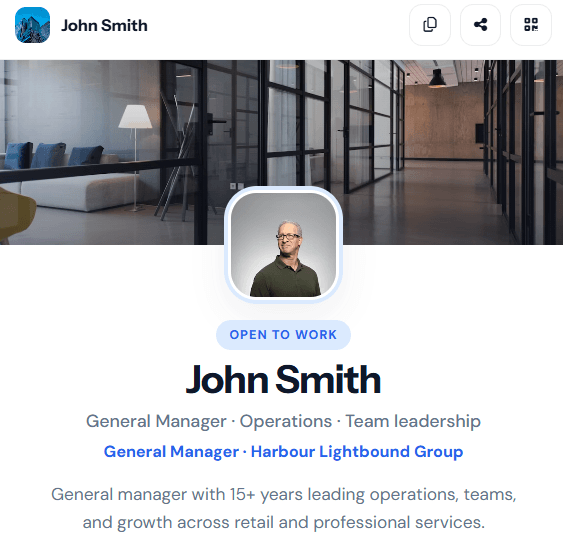
John Smith is a general manager with fifteen years leading operations teams across retail and professional services. He is open to work and tired of sending the same PDF resume and LinkedIn link that only show job titles and dates. Recruiters keep asking what kind of leader he is, how he works, and what he is looking for next — and a traditional profile does not answer that.
For: Job seekers, managers, freelancers, consultants, and anyone who wants to be known for more than a list of achievements
The problem
LinkedIn is built for credentials — job titles, companies, endorsements, and a polished headline. That is useful, but it rarely shows how someone actually leads, what they care about, or what they are trying to grow into next.
A PDF resume is even narrower. It lists achievements but leaves out the context: your working philosophy, the kind of team culture you build, the books that shaped you, or the personal note that makes you memorable after a coffee meeting.
If you are between roles, consulting, or simply want people to understand you as a person — not just a list of past employers — you need something in the middle. More human than a resume. More flexible than a social profile.
Why a full website may be too much
Building a personal website with pages, hosting, and ongoing updates is a lot of work for something you mainly share one-to-one — in an interview, at a networking event, or when a recruiter asks for a link.
Link-in-bio tools help, but they are usually a stack of buttons. They do not give you room for a proper bio, your values, featured projects, testimonials, or a clear open-to-work section. You end up sending three links anyway.
How the t.my Profile template helps
The t.my Profile template is a single, structured personal page — closer to a modern resume and a conversation starter than a corporate LinkedIn profile. See the live example at t.my/johnsmithexample to get a feel for how it reads on mobile.
You add your photo, headline, and short bio, then optionally fill in the sections that matter to you: strengths, values, how you work, skills, experience, what you are open to, featured work, testimonials, and more. Skip anything that does not fit — the page still feels complete.
It works especially well when you want someone to understand your leadership style, not just your job history. John’s example page covers operational leadership, team development, growth goals, favourite books, and a plain-spoken note about life outside work — the kind of detail that helps a hiring manager decide whether you are the right fit.
What you can include
- Profile photo, cover image, headline, role, and company
- Open-to-work or availability status with a clear call to action
- Short bio and a longer about section
- Custom links — resume download, case studies, email, and more
- Contact details with save-to-phone (vCard) support
- At-a-glance highlights — location, experience, what you are open to
- Strengths, growth areas, and growth goals
- Values, passions, and favourite books
- Work philosophy — how you lead and make decisions
- Skills, experience timeline, and current focus
- Featured projects, services, gallery, and testimonials
- A personal note for the human details that do not belong on a resume
- Social profile links
- Built-in QR code on the page — tap to show a scannable code from your phone
Share it in person with QR
This is one of the most practical differences from a static resume. Your profile page includes a QR button. At a networking event, interview waiting room, or coffee catch-up, you tap it and a QR code appears on your screen. The other person scans it and lands on your full profile — no typing a URL, no awkward AirDrop, no PDF attachment.
It feels more like sharing a digital business card, except the destination is a rich personal page rather than a single phone number. You can also print the QR on a business card or one-pager if you want a physical backup.
Where to share it
Put the short link in your email signature, LinkedIn featured section, cover letter, or follow-up message after an interview. Send it when someone asks for your resume — your profile can replace a PDF for first conversations, with a download link for recruiters who still need a document.
Use it in job applications where a personal website is optional but overkill. Share it with mentors, former colleagues, and recruiters you meet informally. The page is easy to update when your focus changes, without redesigning a whole site.
Why built-in analytics matter
Even for a personal page, it helps to know whether people are actually opening your link. t.my shows visits and QR scans without setting up Google Analytics.
Maybe most interest came from the QR code you showed at a conference rather than the link in your email signature. That tells you where to focus next time — and gives you a little confidence that your page is being seen.
Example scenario
John builds t.my/johnsmithexample with his headline, fifteen years of experience, strengths in operational leadership and team development, growth goals for his next role, values like integrity and practicality, and a work philosophy built around clear standards and coaching in the moment.
He links his resume PDF, a leadership case study, and a direct email for role enquiries. His open-to section makes it clear he is looking for general manager and operations leadership roles in Melbourne. Testimonials from a regional director and a former colleague add credibility without sounding like a LinkedIn recommendation wall.
At a local industry meetup he taps the QR button on his profile and lets someone scan it. They read his about section and philosophy on the tram home — and email him the next day about a role that was not posted yet. One link, one conversation, and a clearer picture of who he is than any resume alone could manage.
When a Profile page is the right fit
If you mainly need a quick page for a side project or market stall, the Side Hustle template may be enough. The Profile template is for when the goal is to introduce yourself as a whole person — someone a team would want to work with, not just a list of past titles. It sits between a resume and a full personal website, and for many job seekers and leaders, that is exactly the right amount.
Ready to try it?
Create your own profile page in minutes — short link, QR code, and built-in analytics included.
Create your profile page →Related use cases

How to Create a Simple Online Page Without Building a Full Website
The t.my Side Hustle template gives creators and weekend sellers one clean link with your story, highlights, gallery, contact details, and built-in analytics — no full website required.
Build a Premium-Looking Website Faster with Built-In Analytics
t.my Premium gives you a polished multi-section page — add only the sections you need, share with QR codes, and track visits without plugins or tracking scripts.
A Simple Website Alternative for Sole Traders and Local Tradespeople
Sole traders can share services, photos, and contact details on a t.my trades page — a simple alternative to a full company website.